

Xiaomi’s flagship series phones POCO F7 Pro and Xiaomi 15T Pro have started rolling out the HyperOS 3.1 update. This is not a major feature update, but a maintenance update that focuses on the camera, recorder, and system stability. So let’s quickly take a look at what this update has to offer.
POCO F7 Pro/Xiaomi 15T Pro HyperOS 3.1 Update
The update’s version number is 3.0.301.0.WOKMIXM (HyperOS 3.1). It can be seen with a file size of about 1.1 GB (OTA). Recently, it was officially released Partially (Mi Pilot). This means that it has not yet arrived on everyone’s phone, but all users will get it very soon.
HyperOS 3.1 Update Details
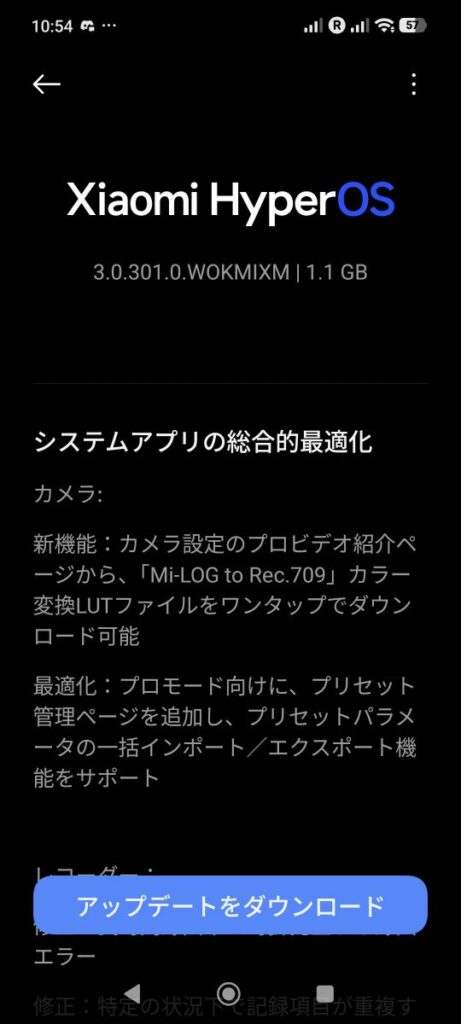
The first thing you will notice after installing the update is the change in the camera. In Pro Video mode, you can now download LUT file for color conversion from “Mi-LOG” to “Rec.709” with one click. This is very useful for videographers. In addition, in Pro mode, you will see new options in the advanced settings page and preset management + mass import/export support has also been added.
Many users have been facing a problem for a while. Crashes or errors would occur when recording for a long time, which has been resolved. The problem of showing the same recording repeatedly in some situations has also been fixed. System apps such as Calendar – It now shows traditional festivals, holidays and special dates more clearly. In addition, General system optimization. The stability of the system has been improved. App crashes will be seen less and the overall performance will provide a smoother experience.
Who will get it and when will it get it?
It has Partial Release, meaning Xiaomi has not sent it to everyone’s phone yet. It has received some random users first. Usually, the Full Release takes place within 7 to 15 days of the start of this release. So most POCO F7 Pro and Xiaomi 15T Pro users will get this update in the first or second week of April.
If you are also wondering whether to install the update or not. Then let me tell you Yes, you should read on because no major bugs have been spotted on your phone yet. Rather, it will help in fixing app crashes, adding more features to the camera Pro Video mode, and increasing security.
If you have not received the update yet, follow these steps: Go to Settings > About phone > System updates and click Check for updates. Since this is a major update, it is better to backup your data. The battery may be a little higher for the first 1-2 days after the update (system optimization will continue). If you have received the update, let us know in the comments how your experience was.
Also Read: Redmi Note 14 Pro 4G HyperOS 3 Update for EU and Global Regions: Two Different Updates